
Where Should They Start? Now You Don't Have to Guess
Every subject has a first lesson, and someone has to decide which one it is. Until now that someone was you, working from a grade level, a gut feeling, and whatever you remember from last spring. The Starting Point Check is a short activity your student does once per subject that answers the question for you, and shows its work.

The guess every parent has to make
Say your fourth grader is picking up Geometry. Primer's Geometry path runs from kindergarten shapes all the way up through eighth grade, forty units in order, and the first lesson has to land somewhere on it. Start at the beginning and she spends weeks sorting triangles she sorted years ago. Start at "grade 4" and you are trusting that a label from a school she may not have attended describes what she actually knows. Start where you think she is and you are guessing, because that is what any of us can do from across the table.
The guess has a cost either way. Too low and the lessons are boring, which to a kid feels the same as pointless. Too high and the first week is a wall, which to a kid feels like being bad at it. Both are hard to recover from, and both are the parent's fault in a way that is not fair to the parent, because nobody gave you a better tool.
We heard this constantly. "I don't know what level to put him at." "She says she already did this." "Is this too easy or is he just rushing?" The Starting Point Check exists to take that question off your plate.
What it does
When you open a subject on your student's Curriculum tab, Primer now asks: pick the starting unit yourself, or offer a Starting Point Check. Choose the check, and a short activity appears on your student's portal. They do it when they are ready. When they finish, the subject's starting unit is set, the units below it are marked as tested out, and lessons begin at the right place. You can see every question they answered and why the result landed where it did.
Theo Opening a subject on the Curriculum tab

The whole thing is eighteen questions in four short parts, usually ten to fifteen minutes, with no timer. It is adaptive: each part is written after the previous one, so the questions climb when the student is doing well and step back when they are not, until Primer has found the edge of what they know. Three decisions, each cutting the remaining range in half, is enough to place a student on a forty-unit path with surprising precision.
A measured start
The first lesson begins at the first thing the student has not mastered, not at the first thing on the list and not at a grade label. Everything below it is credited and skipped, and marked on the path so you can see exactly what was.
A report you can read
Every question, the four choices, what your student picked, and the right answer. Wrong answers come with the likely mix-up behind them and a worked solution. Concepts they handled with confidence and ones worth revisiting are called out by name.
Your estimate, checked
Before the check goes out you answer one question: a bit behind, about right, ahead, or I don't know. It only nudges where the first questions come from. Afterward the report shows what you said next to what the check found.
A safety net
If the first two lessons at the new starting point go badly, Primer moves the start back on its own, puts the skipped units back on the path, and tells you it did. A placement is a starting point, not a verdict.
What it feels like for the student
We were careful here, because the fastest way to ruin a placement is to make it feel like a test. On the student's portal it is called Find Your Starting Spot, and the words test, quiz, score, grade, pass, fail, and level never appear. The ready screen says what is true: some questions will feel easy and some will feel tricky, that is on purpose, and nobody gets them all.
Every question has an I'm Not Sure Yet button, and the student is told that using it helps. It does. A guess is right one time in four whether or not the student knows the material, which makes guesses noisy evidence. An honest "not sure" is the cleanest signal the check gets, so we made it the easiest thing to tap. There is also a small checkbox for "this is just my best guess," which the report shows you later.
Theo Grammar & Conventions, warm-up
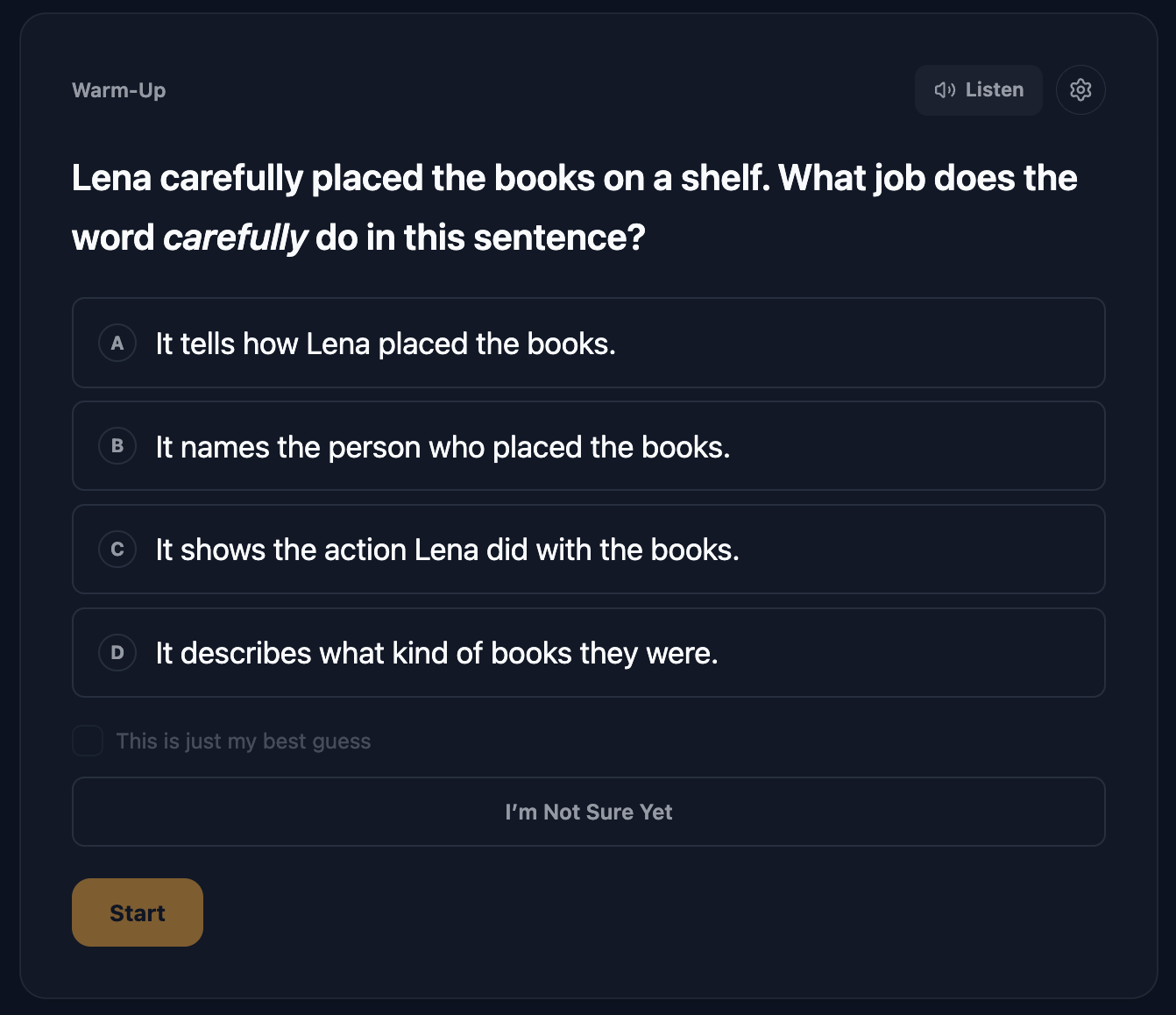
The student never sees whether an answer was right. Between parts the owl says something encouraging, the same thing whatever happened, and the next part loads. At the end they see You Did It! and the name of the unit they are starting on. No score, no count of what they skipped. The results are for you.
Supports carry over. If your student has read-aloud, the dyslexia-friendly font, or other accommodations on file, they are on for the check without anyone having to set them, and the questions are written with those supports in mind. A spelling or phonics question is spoken rather than shown, because showing the word would answer it.
 If you are in the room
Let the hard questions be hard. The check is looking for the edge of what your student knows, and it can only find that edge if it is allowed to reach it. A coached right answer moves the start higher than it should be, and then the first lessons have to undo it. An honest "not sure" is worth more than a rescued answer.
Why we built it this way
A few decisions are worth explaining, because they are the reason the check places well instead of just quickly.
It starts a little below grade. The first real questions come from one step below where the student is expected to be. That sounds backward, but at a student's own frontier success is close to a coin flip, which is the worst place to make a decision from four questions. One step below, the first part usually goes well, the student gets a win, and the check has solid ground to climb from. In our simulations this placed students more accurately on every measure we tracked, at the same length.
It measures clusters, not single skills. The path is grouped into checkpoints, the way standards themselves are grouped, and the check tests at that level. Passing a checkpoint credits everything inside it and everything it builds on, because a student who can find the area of a rectangle can count its sides. That is how three decisions can resolve a path of a dozen checkpoints.
It would rather ask again than decide. Three or four right out of four is a pass, zero or one is not, and two is neither. Two right means four more questions at the same spot before the check moves on. Being slow to decide is cheaper than being wrong.
It does not trust fast taps. An answer given in under about three seconds is not counted toward a decision, because it is usually a tap rather than a thought. That rule is switched off automatically for students with accommodations, a learning difference noted at intake, or a pacing need, and the report tells you which way it was set.
Still your call
Nothing about this takes the decision away from you. You can pick the starting unit by hand instead, before or after a check, by clicking any unit on the path and choosing Start Here. You can run the check again after a long break or when the level feels off. You can turn it off for a student entirely on the Format tab. And the report is there so that when you do override a result, you are doing it with more information than you had before, not less.
Two honest limits. The check works best from second grade up; for kindergarten and first grade students Primer says so and leaves the choice to you. And it is not yet available for French and Spanish, which get the pick-it-yourself option for now.
Try it today
The Starting Point Check is live now for every subscriber, on nearly every academic subject and on custom topics too. Open any subject on your student's Curriculum tab and you will see the question. The help center article walks through every screen if you want the details. If you are not a subscriber yet, start a free trial, add a student, and let them find their own starting spot.